
Continue Learning

For remote learning, your instructor will use D2L and possibly Zoom. We have created a set of Student D2L Tutorials and a page dedicated to Zoom's FAQs. If you are new to remote learning. Full Tilt Ahead, a remote learning company, has created Student Remote Learning Toolkit, an excellent guide packed full of tips and recommendations for remote learning success.
Check other sections below for more detailed information. At the very least, review downloadable 1-page Zoom Guide and D2L Guide.
If you require immediate help with course content or assignments, please email your instructor. For technical assistance, contact the LITS Help Line, avaialbe 24-hours a day, seven days a week. Phone (866) 813-1177 or Email: helpdesk@nl.edu
We are here to help!
A member of our Student Support Concierge team is waiting to help you live via Zoom during the hours of 9am-5pm Monday through Friday. Click the button below to join a live video meeting.
Tips for Successful Remote Learning
There are a few effective strategies for helping you learn remotely.
1. Treat a remote course like a "real" course
Have the discipline to sit down and say, “I am going to work on this,” as well as the dedication to actually follow through.
Remember that you are paying to take this remote course, just as you would for a traditional, in-person class. You must “show up” if you’re going to get real value out of your class. Treat your remote classes the same way you would a face-to-face class—or, better yet, a job—and you’ll be off to the right start.
2. Hold yourself accountable
Set goals at the beginning of the quarter, and check in with yourself weekly. Pair up with a fellow classmate or enlist the help of a spouse or friend to check in as an accountability partner. By being organized, proactive, and self-aware, you can get the most from your remote class even when life outside of school becomes chaotic.
3. Practice time management
- Look at the syllabus at the start of the quarter and make note of major assignments. Mark them on a calendar you check regularly so you know what workload is coming in the weeks ahead.
- Create a weekly schedule that you follow, designating certain hours each week to reading, completing assignments, studying, and participating in forums. Commit to making your remote class coursework part of your weekly routine, and set reminders for yourself to complete these tasks.
- When working on your assignments, try time-blocking, allotting yourself a certain amount of time for each task before moving on to the next one and setting a timer to keep you accountable.
- Create a regular study space and stay organized.
4. Eliminate distractions
Consider turning your cell phone off to avoid losing focus every time a text message or notification pops up. And if you’re still having trouble resisting the temptation to check your email or surf the web, try downloading a website blocker. Using applications like Cold Turkey and Freedom can help eliminate distractions by blocking the apps or websites that tend to compete for your attention, such as Facebook and Twitter.
5. Figure out how you learn best
Once you’ve established where you’ll learn, think about when and how you accomplish your best work. If you’re a morning person, make time to study first thing. More of a night owl? Set aside an hour or two after dinner to cozy up to your computer. If the kids require your morning and evening attention, try to carve out a study session mid-day while they’re at school. Brew your usual cup of coffee, put on your go-to playlist, and do whatever you need to get into the zone and down to business.
6. Actively participate
Participate in the course’s online forum to help you better understand course materials and engage with fellow classmates. This might involve commenting on a classmate’s paper on a discussion board or posting a question about a project you’re working on. Read what other students and your professor are saying, and if you have a question, ask for clarification.
Make sure you are checking in as often as you can, too. The flexibility of remote learning means that if you have 30 minutes before dinner plans, you could squeeze in a discussion response around your schedule. Set a goal to check in on the class discussion threads every day.
7. Leverage your network
Remote classes may sometimes make you feel like you are learning on your own, but this couldn’t be further from the truth. NLU courses are built around the concept of collaboration.
Build relationships with other students by introducing yourself and engaging in online discussion boards. Your peers can be a valuable resource when preparing for exams or asking for feedback on assignments. Don’t be afraid to turn to them to create a virtual study group.
(Credit for the summary above: Northeastern University, Boston)
- Stay in touch with your professor through email and within D2L (the learning management system)
- Review all course announcements in D2L everyday
- Check your NLU email at least once a day
- Contact your professor by email with any questions, or use the submit questions in the designated space in D2L
- Vist our Student Resource page for help using more of the functions in D2L
- Schedule time to learn by going through the week's module and setting aside an appropriate amount of time during the week to:
- Login to D2L daily
- Read/watch the course materials for the week
- Attend virtual class meetings, if applicable
- Complete your homework by the due dates
Your instructor may schedule a virtual class meeting, where your classmates and instructor will meet on Zoom, a video conferencing platform. Before the class meeting, you might want to watch this video about Zoom.
Additional support can be found on Zoom's FAQ page.
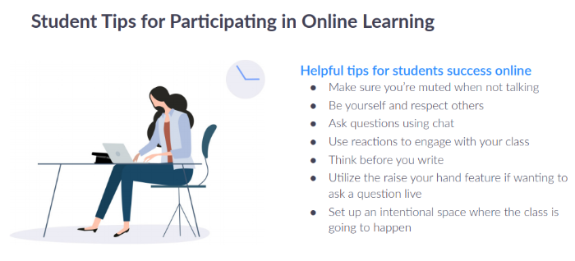
Here are some helpful, netiquette tips for participating in Zoom class meetings:
INT 102: Introduction to Virtual Learning is a short 3 module course that is designed to assist students who may not have originally planned on taking classes remotely. The three modules include: Becoming a Virtual Learner, Using D2L, and Using Zoom. These modules can also be found in INT 101.
This course covers preparing for classes, managing time and stress, getting support, using and troubleshooting D2L and Zoom, Zoom etiquette, and more. There are no assignments, tests, or discussion boards and is simply a gathering of helpful resources if you need them!
INT 102: Introduction to Virtual Learning:
- Becoming a Virtual Learner
- Creating your workspace
- Preparing technology
- Managing time
- Managing stress
- Connecting with others
- Getting support
- Using D2L
- What is D2L?
- How to use D2L?
- Getting Help with D2L
- Using Zoom
- What is Zoom?
- How to use Zoom?
- Participating in Zoom class
- Troubleshooting and getting help with Zoom
We want to assure our community that we are present and here to support you within our new virtual campus. We want to implore you to STAY CONNECTED: with your peers, with your professors, with your mentors and staff members. We are stronger together and we will get through this as a community as we continue to redefine success in the classroom, in the workplace and on our virtual campus.
Through various online outlets, we will continue to share what’s virtually happening within the university. Follow us on social media and participate in our photo challenges or mid-day dance parties. Used to attending Movie Monday, Trivia Nights, and book club? You still can! The Offices of Student Life and Student Experience are dedicated to keeping you engaged! Log in and have some fun with us!
@NLUStudentLife Social Media
Our Learning Support team provides academic assistance to students in a variety of ways. Here are some ways you can engage with us:
- Make a one-on-one appointment with a Learning Support Specialist on topics including Writing, Math, Science and Technology. Appointments are available by phone and Zoom and can be scheduled online or by contacting learn@nl.edu.
- Use the Drop-off Essay: If you need a paper reviewed, you can submit it online for review by our Learning Support Staff.
- Connect with Tutor.com: All NLU students have access to tutor.com, an online site with 24 hour access to tutors in more than 20 subject areas
Need a book? You can obtain your books for all your coureses through NLU's virtual bookstore. You may shoose eBooks or have hard copy books sent to your home address through this site. Please be sure to check the syllabus in your D2L Course before ordering from the virtual bookstore.
Need support beyond academics? You have access to up to 6 free counseling sessions. Counseling is provided by Skylight Counseling Center and is available remotely. During times of university closure, in-person Counseling will not be available, but you are still able to meet with a counselor using remote tools. You can schedule an appointments with Skylight Counseling by contacting counseling@nl.edu
You can complete all of your research online through the Library's web site. You can also work directly with Library faculty to support your research by contacting library@nl.edu - Library faculty can help you find articles e-books, and can suggest relevant databases to use and are available to meet with you on Zoom.
If you have questions on digital resources, research assistance, or other Library issues, you can email us at Library@nl.edu anytime or use our chat feature on the right sidebar during the following hours:
Monday - Thursday 9 am - 7 pm
Friday 9 am - 5 pm
We also have online workshops available. To see the schedule for upcoming workshops, click here.
If you would like to work with a librarian online, please make an appointment to ensure availability.
Need to register for courses? Advisors and Sucess Coaches are available to you via email, phone, Skype, and Zoom. You can contact your advisor or coah directly, or use the links below.
- If you would like to register for next term courses and know what classes you would like to take, you may submit an online request form.
- If you are a Pathways student in need of advising, please contact your Success Coach.
- If you are not a Pathway student and are in need of advising, you may contact your advisor or advising@nl.edu, or visit the advising homepage for more information.
-
