
Designate Pronouns in D2L
Did you know? You can chose to designate your pronouns in your account settings and share them with your colleagues in various areas of Brightspace learning environment, now including the classlist. Read on for how-to information and for a FAQ about the use of pronouns in the Learning Environment. (Note that this information is specfic to the learning environment; Pronouns in Banner are handled differently.)
How to Set Up Pronouns in Brightspace
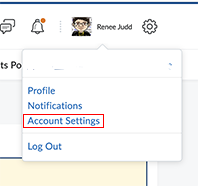 In your personal menu, choose "Account Settings".
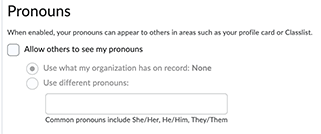
- Scroll to the "Pronouns" section.
- If you wish to display your pronouns, click the "Allow others to see my pronouns" checkbox.
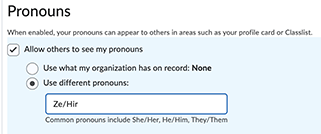
- Two options are displayed with selection bullets. The first choice will NOT display pronouns, because there is no system that prepopulates your D2L account with pronouns. To display any pronouns, choose the second option, "Use different pronouns."
- Type your pronouns into the text box.
- Save and close.
Pronoun FAQ
- Are we required to designate our pronouns in D2L?
- No, it is not required that you set up pronouns. The areas of the learning environment that can set or display pronouns will continue to work just fine for you if you do not set up pronouns.
 I want to set up pronouns, but I don't want any of the options suggested in the form.
- The text entry form in Brightspace will accept whatever pronouns you wish to designate. The form provides three examples (he/him, she/her, and they/them), but you are not limited to the three examples.
- I already set up my pronouns for the NLU portal. Do I have to set them in D2L as well?
- At this time, pronouns are not sent from Banner to D2L, so if you wish to display pronouns in Brightspace, you need to set them up in Brightspace.
- What is the purpose of the pronouns?
- You show respect for a person when you refer to them by their pronouns.
- How can I set my pronouns/chosen name/gender designation in Banner, our Student Information System?
- To designate these personal information fields in Banner, go to the Office of the Registrar, gender-marker-and-pronouns-chosen-name page. Please note that while a chosen first name will be sent automatically from Banner to D2L, pronouns are not sent and are distinct in each system. Gender designation is not stored in our D2L instance. To see the related information that' is stored, or not, in your Banner account, go to the "My Services" page in the NLU Portal, and click "Personal Information".
