What's new for Winter 2022?
Winter 2022 classes will implement a new, simpler way of managing Discussion dates. Editing and creating Assignments will make use of a new, cleaner, interface. There is also a fun feature available to both instructors and students in Winter classes: tagging each other with @mentions in Discussions.
Discussion Date Redesign
Before: Two confusing kinds of dates for a Discussion forum or topic, visibility dates and unlocked dates, with start and end for each.
After: One set of start and end dates for a Discussion forum or topic, with clear choices as to what happens before the start and after the end.
Practical Examples: Discussion Settings
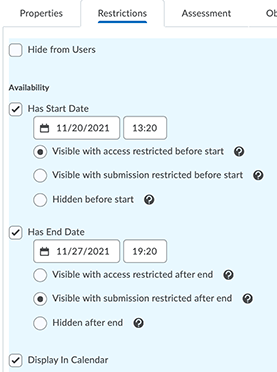
Option: Restrict access before, restrict submission after.
Result: Before the start, students see only the title and dates, both in the Discussion list and in Content. After the End Date, students can see the full discussion, but cannot post or Reply.
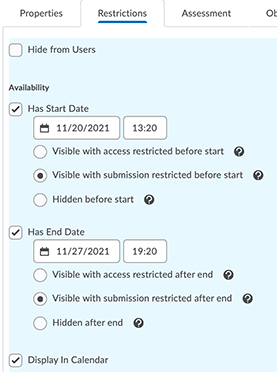
Option: Restrict submission before the start date as well as after the end.
Result: Before the start, students see the Discussion title, dates, and prompt in the Discussion list and in Content. After the End Date, students can see the full discussion, but cannot post or Reply.
New Assignment Create/Edit Experience
When you first ogo to create or edit an Assignment with the new experience, you may wonder, "Where did all my settings go?" It's OK, they are still available to you, neatly stashed behind one of three panels.
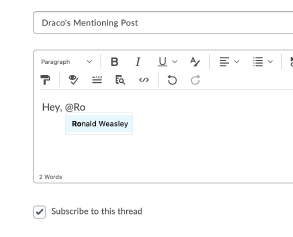
Tag Classmates with @Mention.
This is an added functionality for the new WYSIWYG editor in Discussion, Announcement, and other tools. Simply type @, and begin typing the name of the person. Names of people that match your text will pop up. Click on the correct name to tag them. They will get a notification of being tagged. Are there ways you can make use of this to increase student engagement? Or is this something you want to avoid? Either way, you can let students know in the Communications Expectations.