
SMS Notifications Going Away
There are several ways to receive notifications of updates from your D2L courses: the ubiquitous red dot in your D2L navbar, email, text messages (SMS), and through the Pulse app. One of these methods, SMS texts, is being retired in July 2024. If you are relying on SMS notifications from D2L, it is time to choose another method.
 Why the change?
SMS notifications from D2L use an aging technology, email-to-text. At one time, most mobile service providers supported this technology. With newer notification technologies available, however, many service providers no longer support email-to-text. Since student access to this technology is spotty, and since maintenance across various mobile providers is challenging, D2L has chosen to discontinue its use.
What are my alternatives?
- Email provides a push notification. If you have email on your phone, you can view the messages there. You can set your email app to use your phone's notification system if you want notifications of email on your phone.
- The Brightspace Pulse app also can provide instant push notifications and scheduled notifications through your phone. If you have not yet installed it on your phone, you can find it on your device's app store, and there are app store links in the Notifications settings page (see below).
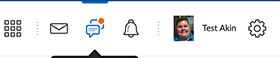 As always, the red notifications dot will continue to show in your D2L navbar. The notification alert can appear on the envelope icon (for "instant message" notifications), the message icon (for Discussion alerts), and the notifications bell (for other alerts, such as new grades and feedback, or new course material).
How do I control the volume and timing of notifications?
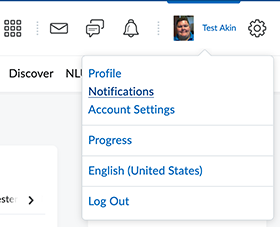 If you got a notification for everything that happens in every D2L course you have, it could become overwhelming. Fortunately, there are choices. The "Notifications" option on your personal menu, which is accessed from your name in the upper right corner of your Brightspace screen, provides options for what events in D2L trigger instant notifications, how you receive instant notifications that you choose to receive, whether, when, and how often you receive summary notifications, which courses can send you notifications, and more. (There are even links for downloading the Pulse app to your mobile device, should you so choose.) For notifications in some course tools, such as Discussions, the Notifications menu page lets you set the overal behavior of tool-specific notifications, while in the tool itself, you can control which items can actually send notifications from that course tool, in that course.
Questions?
Resources
Brightspace SMS Announcement: https://community.d2l.com/brightspace/kb/articles/23351-intent-to-eol-sms-notifications
More about Notifications: https://community.d2l.com/brightspace/kb/articles/17244-brightspace-notification-details
About the Pulse App: https://community.d2l.com/brightspace/kb/articles/1776-manage-your-course-workload-with-brightspace-pulse
NLU Help Desk
The helpdesk is available 24x7 at 1-866-813-1177. Or you may send an email to helpdesk@nl.edu; expect an email response by the following business day.
