
Quiz Improvements (Students)
Taking a quiz in BrightSpace by D2L can involve a little less stress, due to new functionality for managing your own quiz-taking experience.
Hide or Show the Quiz Timer
Before: In the past, instructors decided for everyone whether the quiz timer was displayed when taking a quiz, or not.
After July 20: Students now have the ability to show or hide the timer to reduce anxiety during quiz taking.
How it Works
- Hover over the timer then click on the Hide Timer button to hide the timer from the view.

- Once the timer is hidden you will only see a blue circle that represents how much time is left. If you would like to show the timer again, click the Show Timer (Important! The X next to the Show/Hide button closes the quiz, it does NOT hide the timer.)
- If your quiz has an enforced time limit, warnings will be displayed at the bottom of your screen at certain times to support awareness of time left regardless if the timer is showing or hidden.

- Whichever timer setting you choose, it will be saved as your preference for all quizzes, until you change it yourself.
Quiz Information During the Quiz
Before: You had to exit the quiz to review "Quiz Information" on the quiz start page.
After July 20: You can click the new "Quiz Information" link while taking the quiz, without leaving!
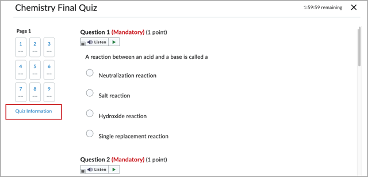
This link will allow you to view quiz information without having to leave the quiz page. Quiz information includes description, time limit, attempts allowed, and other details you instructor includes.
